View Transitions API with HTML-in-canvas
Four experiments with document.startViewTransition(), view-transition-name, element.startViewTransition()
and cross-document transitions, each with a <canvas layoutsubtree> in the page.
The live transitions page doesn't use this API. This page does.
1. A canvas that draws HTML, inside a view transition
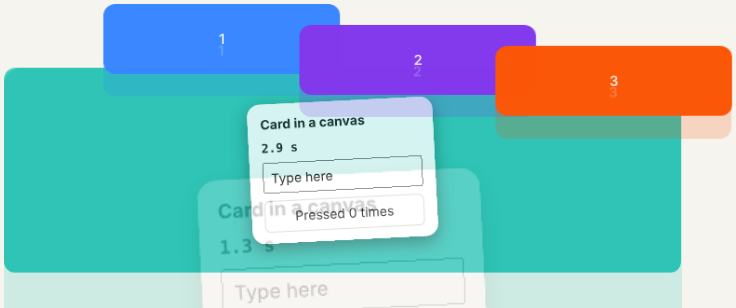
The green area is a canvas. The white card is a child element of the canvas, drawn with drawElementImage() at a slight angle.
"Swap layout" changes the grid inside a view transition. Choose which element has a view-transition-name and where the transition starts.
Show the code a canvas with HTML children in a view transition
- The markup. The card is a child of the canvas, so the page doesn't paint it. The canvas does.
- The names. The canvas is a replaced element, so it can carry a
view-transition-namelike an image can. - Draw the card. 2D
drawElementImage()also sets where clicks on the card land. - Start the transition.
startViewTransition()exists ondocumentand, in Chromium 157, on every element.
- Name on the canvas: works. The old snapshot contains the card as the canvas drew it. The new snapshot is live: the clock in the card keeps counting while the canvas moves and changes size. The canvas gets
paintevents during the transition. - Name on the card: the group moves, the picture is empty. Chromium makes
::view-transition-group(the-card)and animates it between the two placesdrawElementImage()put the card, but both snapshots are blank. The card only shows inside the canvas cross-fade. - Started on the grid element: works, the same as on the document, and the rest of the page stays interactive.
- Started on the canvas element: the canvas is blank for the length of the transition. A scope takes part in its own transition as
view-transition-name: root, and the pseudo-elements that would show its snapshot are inside the canvas, which renders none of its contents. - Started on the canvas element with
view-transition-name: noneon it: the canvas keeps drawing. The transition runs and shows nothing. The tiles jump, because they're outside the scope. Experiment 4 uses this. - Started on a
drawablechild of the canvas: the tab crashes. This is on its own page so that it can't take this one down. A child without thedrawableattribute doesn't crash, and can't be drawn.
2. A shader in place of the cross-fade
The box below is a <live-transition> element with a view-transition-name.
The view transition moves the box. The old snapshot is hidden and the new one isn't faded, so what shows is the live canvas, and the canvas runs a shader from the first state to the second.
First state
Moved by the view transition.
Second state
Drawn by a shader.
Show the code the view transition moves the box, the canvas draws the change
- The markup.
- Turn off the cross-fade for this name. The new snapshot of a view transition is live, so a canvas that keeps drawing shows through it.
- Prepare the shader first, then start both. Rendering is paused while the update callback runs, so anything that waits for a
paintevent has to happen beforestartViewTransition().
3. Between two documents
Two pages opt in with @view-transition { navigation: auto }. Each has a canvas with the same view-transition-name.
The second link also passes the old page's canvas pixels to the new page, which burns from them to its own content.
Open the two pages, cross-fade
Open the two pages, shader between documents
4. A transition scoped to the canvas, drawn by the canvas
The six items below are HTML in a grid, inside one canvas. "Shuffle" calls canvas.startViewTransition() and reorders them.
The browser makes a group for each named item but shows none of them, because they're inside the canvas.
The canvas reads each group's animation as a clock and draws the item on its way from the old box to the new one, with an arc and a turn that a group animation couldn't add to live HTML.
Show the code CSS times the move, the canvas draws it
- The markup. One
drawablewrapper holds the grid, so CSS grid lays the items out. Each item has aview-transition-name. - The clock. The group's own keyframes are replaced by one that animates a registered custom property from 0 to 1. Duration, easing and per-item delay stay in CSS.
- Start the transition on the canvas. Measure the old boxes first. The new ones are the layout after the callback.
- Draw each item. The nine-argument
drawElementImage()copies one item's rectangle out of the wrapper's picture to wherever the clock says it is.
- Works, with the canvas doing the geometry. In a transition scoped to the canvas, every
::view-transition-group()reports its size but sits at 0,0, so the positions come fromoffsetLeftandoffsetTopbefore and after the change. The timing comes from the group animations. - The page stays interactive and other scoped transitions can run at the same time: press "Swap layout" in experiment 1 with "the grid element" during a slow shuffle.
- The items are live while they move (the clocks count), but clicks reach them only at rest. The wrapper has one hit box, and the pieces are drawn apart.
- Direct children of a canvas don't flow. Each
drawablechild is laid out alone at the canvas origin, which is why the grid is one child and the items are its children.
Live checks
These run when this section is on screen, on the fixtures in the box below. Two of them start a transition on the whole document for a moment. Nothing visible changes in it.
Findings
- A drawable canvas takes part in a view transition as one picture. Its snapshot is the canvas bitmap, HTML children included. The new snapshot is live, so the canvas can keep animating under
::view-transition-new(). - A canvas child can't be its own transition element. It gets a group with the right box and no picture. To move one element on its own, give it its own canvas and name that canvas.
- The old and new snapshots can't be read from script. There is no call that hands
::view-transition-old()to a canvas or a shader. A shader transition has to keep both states itself (two live elements, or anElementImagetaken before the change) and switch the cross-fade off. - Work that waits for a
paintevent must be done beforestartViewTransition(). The canvas gets nopaintevent while the update callback is pending. - Element-scoped transitions (Chrome 147 and later). On an ancestor of the canvas they work as on the document. On the canvas they blank it, unless the canvas has
view-transition-name: none: then it keeps drawing and the transition is an invisible set of group animations that the canvas can read. On adrawablechild of the canvas they crash the renderer in Chromium 157. - Inside a canvas-scoped transition, group sizes are right and group positions are all 0,0. In a document transition the group of a canvas child has the position that
drawElementImage()gave it. - Between documents, a named canvas cross-fades like any other element. An
ElementImagecan't follow the navigation, so a shader between two documents needs pixels: the old page stores a picture of its canvas, and the new page draws from that picture to its live content.
Not tried yet
- Run the items of experiment 4 through a WebGL or WebGPU shader (trails, bending) with the same CSS clock.
- Nested scopes: a scoped transition on the grid element with a canvas-scoped one inside it.
- Navigation API
navigatewithintercept()and a shader transition for a single-page app's route changes. view-transition-classand nested groups (view-transition-group: contain) with one canvas per list item.- A page-wide shader: put the whole page in one canvas, so that a transition between any two states is drawn by the canvas and the View Transitions API is only used for timing.
References
- Run concurrent and nested view transitions with element-scoped view transitions, Chrome for Developers. Covers
element.startViewTransition(),view-transition-scope, self-participation and clipping. - Chrome 147 enables concurrent and nested view transitions, the launch post. Developer testing began in Chrome 140.
- Using element-scoped view transitions and
Element.startViewTransition(), MDN. - CSS View Transitions Module Level 2, the specification, and the element-scoped explainer.
- My Patagonia trip, the Chrome team's sample: scoped transitions for filtering a grid, adding items and a sidebar list.
- Cross-document view transitions, Chrome for Developers:
@view-transition,pageswapandpagereveal.